What Is the Terminal?
In short, the terminal is an text interface that you can use to interact with an OS. The Terminal is also known as Command-Line or Shell.
What Can You Do Inside the Terminal?
The terminal’s command line allows you to type commands, navigate and manipulate files and folders, execute programs, and open documents among many other things.
List of Basic Terminal Commands and Their Functions
‘ls’: List the contents inside a directory (folder)
- The contents provided by ‘
ls -l’include file or directory permissions, the owner of the file, file size in bytes, and the timestamp of the last modification
‘man’: Provides more details for a specified command.
- Typing ‘
man <command>’ will print out more information and use cases for other commands - Note that some commands don't have man pages installed on the HPC. You can also look up '
man <command>'on the Internet to find info
‘pwd’: Prints your current working directory
‘cd’: Changes the directory your terminal is accessing
- Typing ‘
cd /<pathway>’ tells your terminal to point to the specified directory pathway
- Typing ‘
cd’ followed by periods will move the terminal into the parent directory of whatever previous directory you were inside of. You can denote different amounts of periods to move one or more levels upward. For example,
‘cd ..’ will move up one parent directory while ‘cd ../..’ will move up twice.
- Typing ‘
cd’ by itself will move the terminal into the home directory of the system
‘touch’: Creates an empty file or updates the timestamp of an existing file
‘mkdir’: Creates an empty directory
‘cp’: Allows you to copy files or directories
‘mv’: Moves files or directories with the option of renaming them
- To rename a file as you move it, you can type in the pathway of the directory you are moving your file to followed by ‘
/<new file name>’
‘rm’: Removes files or directories
- Using ‘
rm’ by itself removes files from a directory. To remove an entire directory, you must add the -r option and type ‘rm -r <directory name>’. Please double check your files before executing the -r command as to not accidentally remove files you wanted to keep.
‘vim’: One of multiple text editors built into the terminal.
- Typing ‘
vim’ will open up the main page to VIM while typing ‘vim <file name>’ will open a new or existing file for you to edit ('vim <file name>' will allow you to open existing files as well).
VIM: A Text Editor Built Into the Terminal
VIM is a text editor built into the terminal and is available in WAVE’s nodes.
Why Should I Learn To Use VIM?
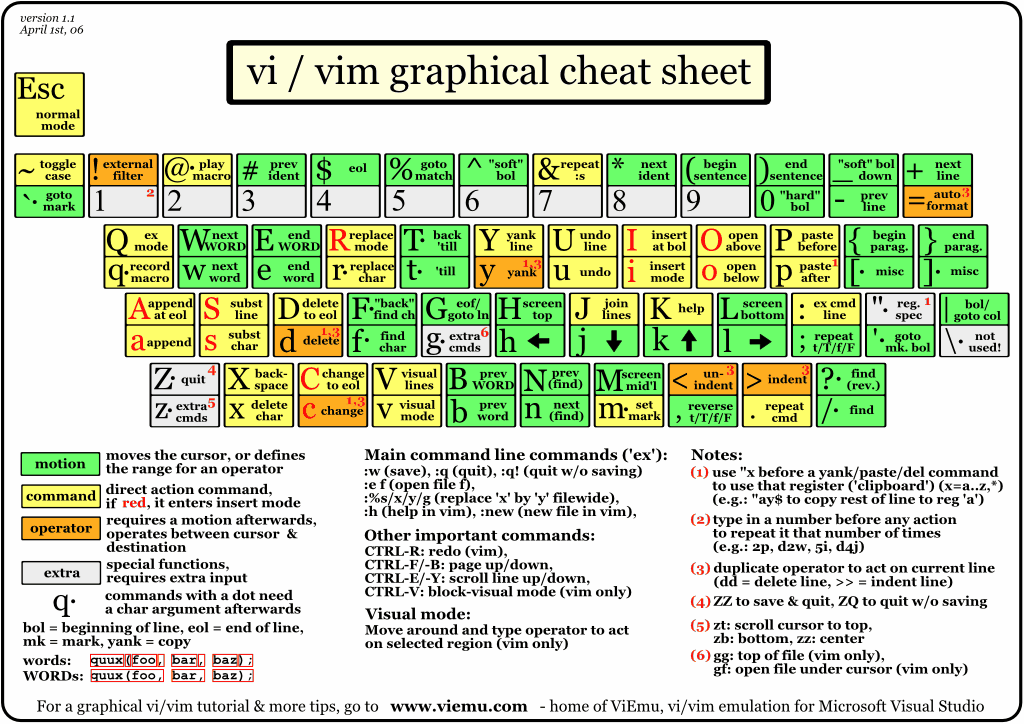
VIM has become highly popular amongst many programmers because of its various editing modes. These modes make it faster and more efficient to make changes to your code. In addition to this, VIM has many more hotkeys and features which will also help you make edits quicker.
Furthermore, because VIM runs in the text-based terminal rather than a graphical user interface, it works seamlessly with our HPC. Users are unable to download new software on the HPC nodes and can’t use other editors without an OSinterface, but VIM is accessible as soon as you SSH login to the HPC.
Still looking for some more information on VIM? Look down below for some additional resources!
Additional VIM Information
VIM Youtube Tutorial (Short)
VIM Youtube Tutorial (In-Depth)
VIM Cheat Sheet