Scheduling Resources with Slurm
The HPC system is a community resource, shared by many users; students, faculty, and staff. As such, it uses a resource scheduling program called Slurm to ensure fair access to computing resources among all users. Slurm allows users to request resources both for interactive and batch mode computing, i.e., a series of commands that are automatically executed when the resources become available and are allocated.
Aside: Slurm, short for “Simple Linux Utility for Resource Management”, is an open-source job scheduler developed to run High Performance Computing (HPC) systems. Slurm is the workload manager for approximately 60% of the top 500 supercomputers. More information on Slurm is available in Additional Slurm Documentation at the end of this page.
Login Node versus Compute Nodes
When you access the HPC, you typically first login to a front end login node. From this front end server you can configure your environment, write code, compile programs, and test software on small data sets. However the login server is a community resource that is shared by all HPC users, and should not be used for large computational tasks. Instead, the login node is your gateway to access the large compute resources available on the backend compute nodes.
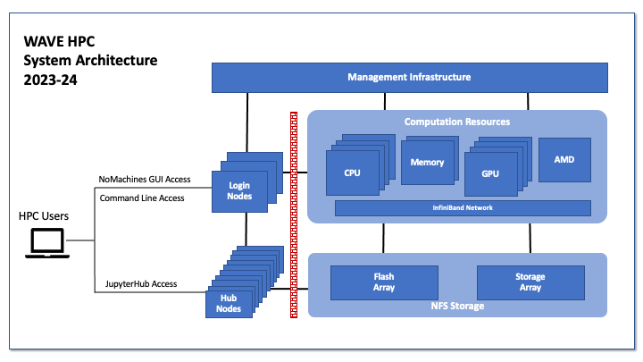

To access the backend compute nodes, a user will use Slurm to either request interactive resources or schedule jobs to be executed by Slurm in batch mode when the resources become available. For large computational tasks it is preferred to use batch processing.
Alternatively, a user can access the HPC through our JupyterHub Interface. JupyterHub will allocate a session for the user on a compute node. By default that would be in the “hub” partition which are nodes tailored to the needs of a typical JupyterHub user. JupyterHub also provides limited access to other computing resources in the backend compute nodes.